September 12, 2022 - Starting the Cataloging
The process of keying in the ISBNs into the Library of Congress search page was just too cumbersome. Time to automate, but we’ll take an old boss of ours advice, Greg Stroud pointed out it was just too hard to automate much more than 95% of a job. So, a LiveCode (successor to Apple’s Hypercard) stack was created and a script written to automatically send a query to the LOC web server and parse out what we needed from the result. We only try to search with the ISBN (the 95%) not attempt to search if that fails. When it doesn’t work, searching by title and author can return tens of thousands of results. So you have to keep trying various things to find the book you want to classify. Forgot to throttle to keep the Library of Congress web people happy. They don’t want to see more than 10 queries per minute, so I throttle the loop to only do 6 per minute to make sure they don’t block my IP address. Here’s the card script:
-- Use https://catalog.loc.gov/index.html to get the bibliography and Library of Congress classification.
--
-- Modification history:
-- Created 9/12/2022
on SendQuery
put card field "SearchField" into searchItems
put "" into card field "Results Field"
-- Break the search field's contents into ISBNS and Titles. Note that titles can be "This book by author". Anything that doesn't have a comma.
-- As of version 9.5.1 split searchItems by comma doesn't work. It fouls out on the first line, putting ONLY the title in
-- the first item, then the 1st lines ISBN with the second lines title. So, we have to break the lines up by hand.
-- Bug reported https://quality.livecode.com/show_bug.cgi?id=23934
put "" into ISBNS
put "" into Titles
put the number of lines of searchItems into temp
repeat with j = 1 to the number of lines of searchItems
put line j of searchItems into tempLine
split templine by comma
put templine[1] & return after Titles
-- Knock out common debris of spaces and dashes
put replaceText(templine[2], "[ -]", "") into curISBN
put curISBN & return after ISBNS
end repeat
repeat with j = 1 to the number of lines of searchItems
put card field "BaseURL" into baseURL
put baseURL & line j of ISBNS into searchURL
put searchURL into card field "SearchURL"
put URL (searchURL) into card field "RawResult"
-- 1st Check for Errors, nothing is going to work if we get the "No Connections" error.
put getLOCitem(card field "RawResult", card field "No Connection Grep Pattern") into NoConnectionError
if NoConnectionError is not empty then
put "Got pesky No Connections Available Error" & return after card field "Results Field"
break
end if
put getLOCitem(card field "RawResult", card field "IP Request Form Pattern") into IPRequestFormError
if IPRequestFormError is not empty then
put "Got IP Request form Error" & return after card field "Results Field"
break
end if
put getLOCitem(card field "RawResult", card field "Permalink Grep Pattern") into permLink
if permLink is empty then
put "Search Failed for ISBN: " & line j of ISBNS & " ," & line j of Titles & return after card field "Results Field"
set the foreColor of word 1 to 4 of last line of field "Results Field" to "red"
else
put getLOCitem(card field "RawResult", card field "Author Grep Pattern") into Author
put getLOCitem(card field "RawResult", card field "Book Title Grep Pattern") into Title
put getLOCitem(card field "RawResult", card field "Classification Grep Pattern") into Classification
-- Have to put a bar space if front the ISBN so Apple numbers won't think it's a number and trim off leading zeros. ISBN should really have
-- been International Standard Book IDENTIFIER! This bug in numbers has been around since 2015 https://discussions.apple.com/thread/6826306
put Author & tab & Title & tab & Classification & tab & "| " & line j of ISBNS & tab & permLink & return after card field "Results Field"
end if
-- Make less than 10 requests per minute
wait 10 seconds
end repeat
-- Trim last new line so Numbers won't think the ISBN is a number
delete the last character of card field "Results Field"
end SendQuery
-- Get the LOC permalink from the HTML page
function getLOCitem HTML, grepPattern
put "" into LOCitem
put matchText(HTML, grepPattern, LOCitem ) into theResult
return LOCitem
end getLOCitem
on closeCard
end closeCard
There’s also a tiny script in the “Send Query” Button:
on mouseUp
SendQuery
end mouseUp
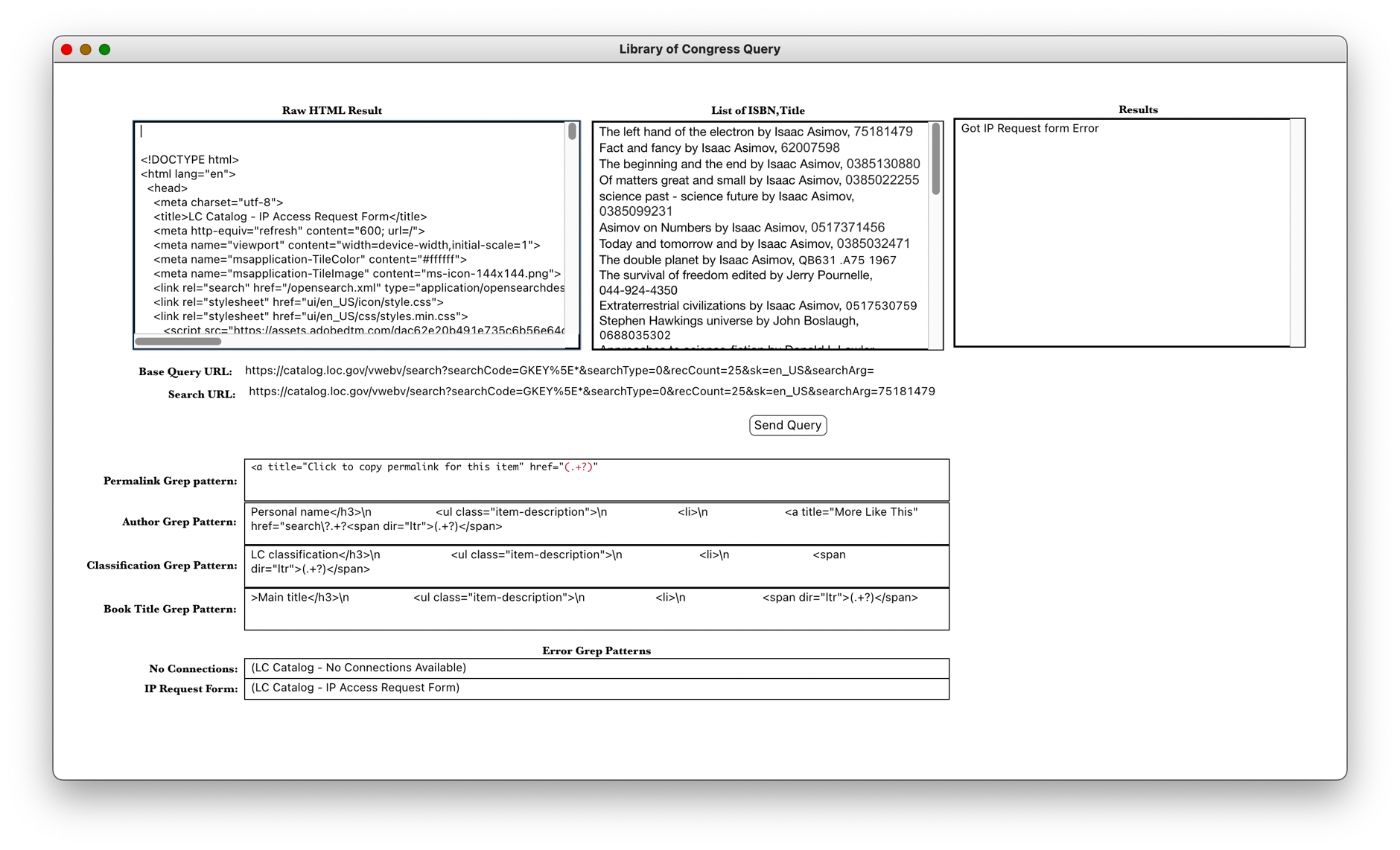
Above is a screenshot of the single card LiveCode stack. By keeping all the greps and URLs in text fields, we can follow any changes the Library of Congress makes to their web site without making any code changes. What this stack is doing is called “Screen Scraping” because we’re grepping the returned HTML that a browser would display instead of using an API (application program interface) that the LOC provides as an extremely expensive subscription service. Even if we did subscribe, we’d still have to write code to handle its results.